





A free WooCommerce plugin

Everything a Bulgarian online store needs.

Couriers, invoices and Ordinance N-18, the NRA audit file, quick orders, abandoned carts and customer checks. In one plugin, on your own site.

SHA-256: 8ef8ad628bea0fe61d6b4afe6c4113e6745bc9dbd03af94ce1889216f7439ce0

  • Free, GPLv3
  • WordPress 6.5+
  • WooCommerce 9.4+
  • PHP 8.2+
Example: choose a courier
Bai Ganyo peeking at the couriers
Couriers
  • Econt
  • Speedy
  • BOX NOW
  • Pigeon Express

Your store, your data.

Prices, labels and documents are made by your site and go only to the services you turn on.

It is free

Every feature in this plugin is free and open source (GPLv3). No ads and no locked features in wp-admin.

Nothing comes to us

Your site talks directly to the couriers and services you turn on. The NRA audit file is made on your site.

Any checkout

The classic checkout, the block checkout and page builder checkouts, multi-step ones included.

Features

From the cart to the audit file.

Everything you would otherwise piece together from five different plugins.

Couriers

Econt, Speedy, BOX NOW and Pigeon Express.

Delivery to an office, a locker or an address, with live prices from your contract. Without a courier account, the courier’s public price list is used, so customers can always order.

  • Waybills and labels from the order or for many orders at once, optionally right after checkout.
  • Who pays the courier: for each shipping method, choose the payment methods for which the customer pays the delivery to the courier. It then stays out of the total, the invoice and the NRA file.
  • Courier requests for Econt and Speedy. Weekends and holidays are skipped.
  • The order status follows the parcel: delivered or returned.
  • Tracking on the customer’s order page and in the order emails.
  • Box size worked out automatically from product weights and dimensions.

Couriers

On
  • EcontOffice, locker, address · courier request · mapLabels
  • SpeedyOffice, locker, address · courier request · mapLabels
  • BOX NOWLockersLabels
  • Pigeon ExpressOffice, locker, addressLabels
  • Shipping abroadEcont: Romania, Greece · Speedy: 9 EU countriesOptional
Bai Ganyo with a parcel

Checkout

A checkout that speaks Bulgarian.

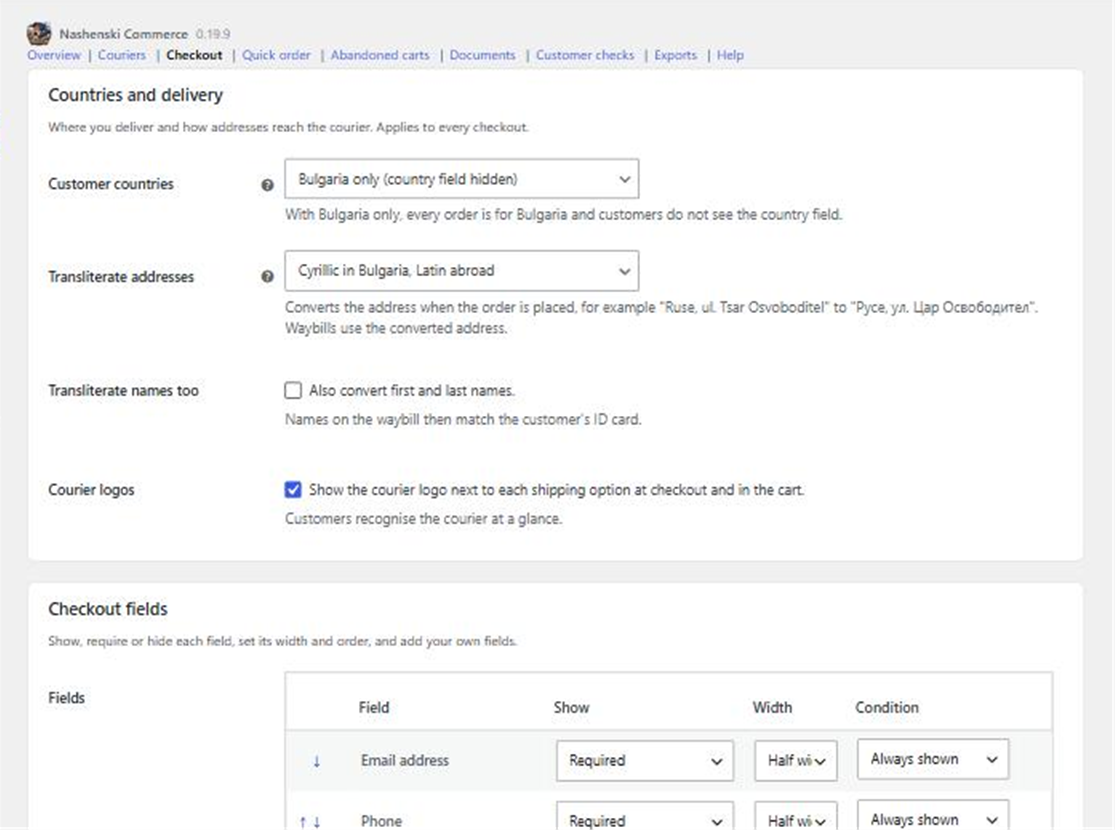
The customer picks an office, a locker or an address from a list or from the courier’s map. Addresses are converted to Cyrillic for the waybill.

  • Company invoice fields: company, EIK, VAT number, MOL, with an EU VIES check.
  • Field editor: order, width, required or hidden, and “show when…” conditions.
  • Transliteration: “Ruse, ul. Tsar Osvoboditel” becomes “Русе, ул. Цар Освободител”.
  • Shipping options as cards, buttons side by side or your theme’s list, with “Free shipping over…” under each option and a free shipping progress bar.
  • Look taken from your theme’s design tokens, or TokenForge’s.
The Checkout settings page: countries, courier logos, transliteration and fields
Settings → Checkout

Documents and Ordinance N-18

Invoices and N-18 documents without a separate program.

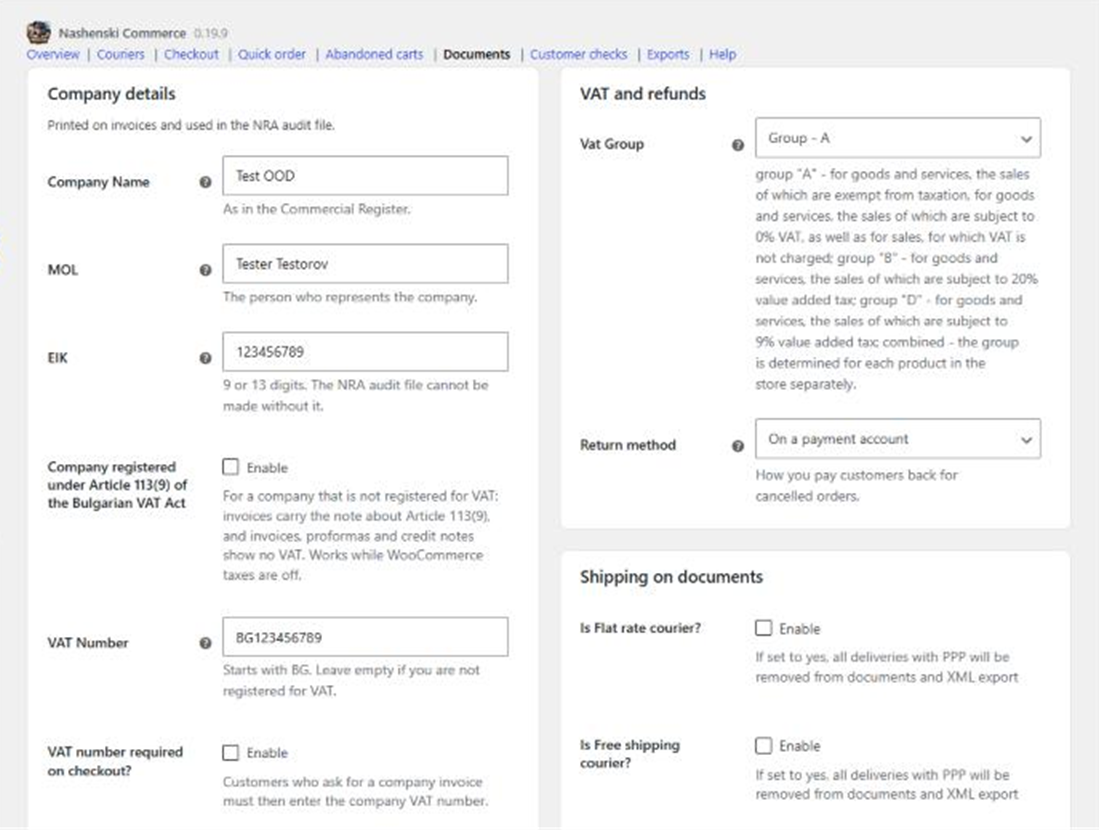
An order document for every order, invoices, credit notes and pro formas as PDF, in Bulgarian and English. Numbers never repeat.

  • NRA audit XML file (Annex 38), checked against the NRA schema before it is saved.
  • Your accountant gets it by email on the 1st of every month, if you want.
  • VAT groups A, B, D, and Article 113(9) of the VAT Act for companies not registered for VAT.
  • Exports: invoice archive, Microinvest Delta and your own exports in CSV, Excel, JSON or XML.
  • Private folder: documents never show in the Media Library.
The Documents page with company details and VAT settings
Settings → Documents

Customer checks

Fewer refused cash-on-delivery parcels.

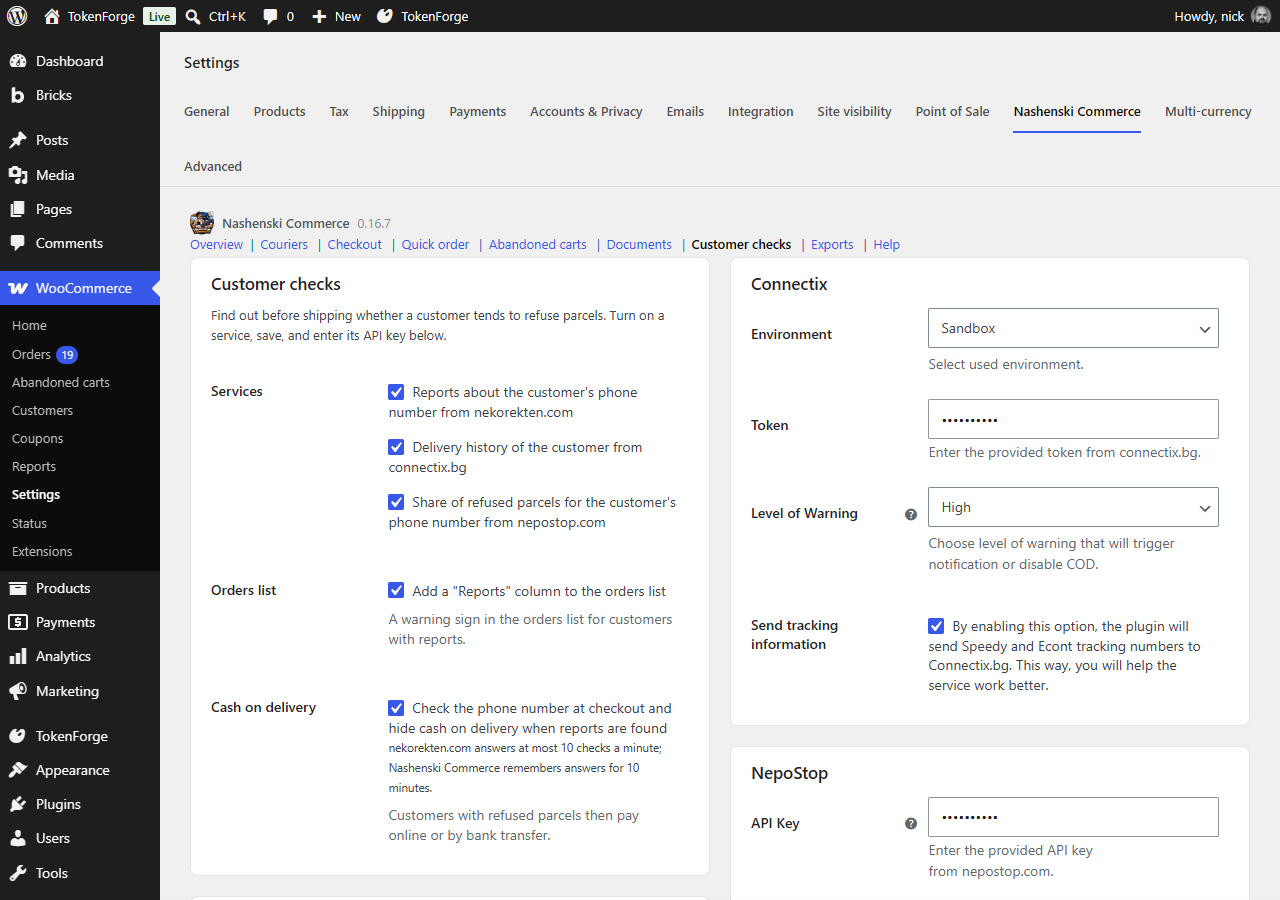
nekorekten.com, Connectix and NepoStop tell you whether a customer’s phone has a history of refused parcels. If it does, cash on delivery is hidden and the customer pays online.

  • A “Reports” column in the orders list and every service’s answer on the order.
  • Send a report to nekorekten.com straight from the order.
  • Only with your keys: a service without a key is never asked.
The Customer checks settings with nekorekten.com, Connectix and NepoStop
Settings → Customer checks

Quick order and abandoned carts

Sales you would otherwise miss.

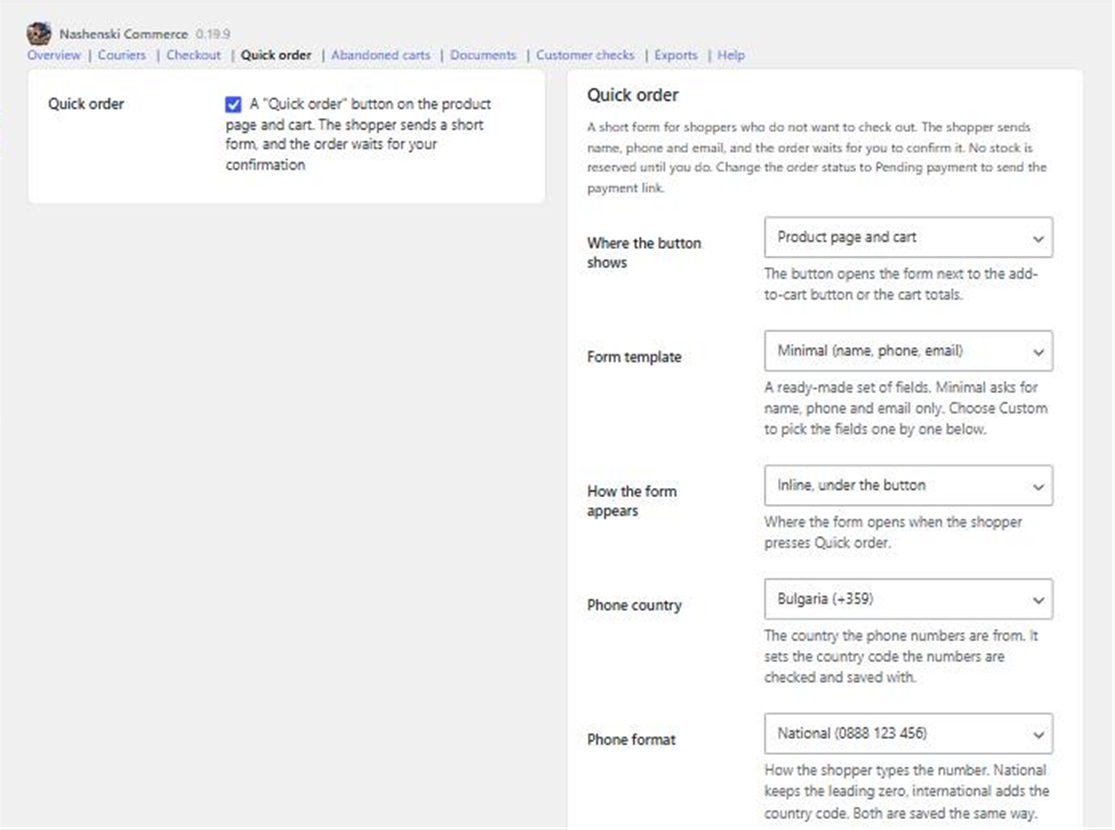
A “Quick order” button on the product or in the cart: name, phone, email. The order waits for your confirmation and you choose the delivery.

  • A dialog, inline or a side panel, with a ready-made or your own form.
  • Abandoned carts: up to three email reminders, only between 08:00 and 22:00.
  • A single-use coupon and a link that refills the cart.
The Quick order settings
Settings → Quick order

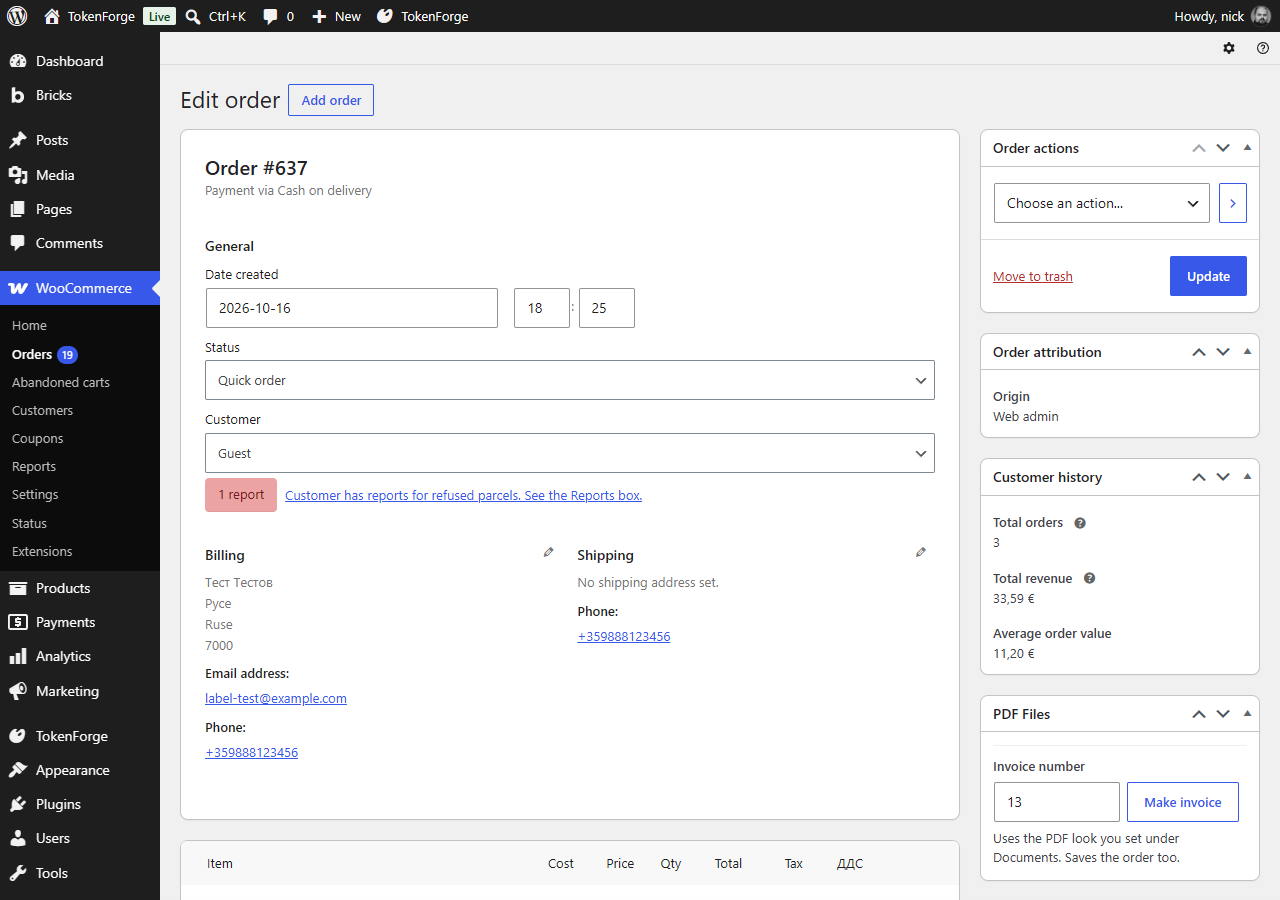
Orders

Everything about the order on one screen.

The courier, the waybill and its status, the invoice and the customer checks, right where you work every day.

  • “Make invoice” with the next number filled in for you.
  • Bulk actions: waybills and courier requests for many orders at once.
  • Customer history: orders, revenue and reports.
The order screen with the courier, customer history and PDF files boxes
A WooCommerce order

And more

The small things that save hours.

EU withdrawal function, Directive 2011/83/EU Art. 11a

The “withdraw from contract here” link required from 19 June 2026: on every page, on each order in My Account and in the order emails during the withdrawal period. Requests land on the order. Needs WooCommerce 11.1.

[nashenski_withdrawal_link]Any theme or builder


Bulgarian and English

Every text and every document in both languages.

WP-CLI

Every setting from the command line, with the same checks as the screen.

$ wp nashenski setting set apis_enable_econt yes
$ echo "$ECONT_PASSWORD" | wp nashenski setting set econt_password -
$ wp nashenski courier check econt
Success: The Econt login works.

“Mathematically impossible” prices

Finds VAT-inclusive prices that cannot be split into a net price and VAT without rounding, and fixes them in one click.

Recommended settings

Tick the ones to apply. Nothing else changes.

Your own exports

Orders, products sold or documents, with your filters and columns.

CSVExcelJSONXML

Price lists that check themselves

Once a week the public prices are compared with the courier website. When they change, a notice tells you and you decide whether to save them.

EcontSpeedyPigeon Express

Compare

One free plugin instead of five.

See what you get compared with other plugins, module by module.

  • 0 €for the whole plugin
  • 10modules in one plugin
  • 35+security measures
  • 8plugins you can switch from in one click

Switching

Switch from another plugin in a minute.

The import brings over the courier logins, sender details, waybill numbers, shipping zone methods and document numbers. Then you deactivate the old plugin. It all happens on your site.

How the import works
  • Bulgarisation for WooCommerce4.x and 5.x
  • Econt Expressmreja.net
  • BOX NOW Deliverymreja.net
  • Speedy shipping methodmreja.net
  • Pigeon Express shippingmreja.net
  • Ordinance N-18 (light regime)mreja.net
  • Drusoft ShippingEcont and Speedy
  • Econt Delivery · Speedy Shippingthe official plugins

Nashenski Pro: a store assistant and legal checks.

A paid add-on on top of the free plugin. The free plugin stays complete and free.

What Pro adds
  • A Bulgarian assistant in wp-admin
  • Checks against ЗЕТ, ЗЗП and GDPR, and legal texts
  • A cookie banner and Google Tag Manager

Frequently asked questions

Is it really free?

Yes. Nashenski Commerce and all of its features are free and open source under GPLv3. Only the separate Nashenski Pro add-on is paid.

Does my data go through a third-party server?

No, not with the free plugin. Your site talks directly to the couriers and services you turn on. The NRA audit file is made on your site. Nothing is sent to us. The paid Nashenski Pro add-on is different: its chat goes through the Nashenski Pro server and sends store and product data, totals, counts, order numbers and statuses, never customers’ names, addresses, emails or phone numbers.

Do I need a courier account?

No. Without one, prices come from the courier’s public price list, which is built in. With an account, prices are live from your contract and waybills are made from the order.

Does it work with the block checkout and page builders?

Yes. With the classic checkout, the block checkout and page builder checkout pages, multi-step ones included.

Can I move from Bulgarisation or mreja.net?

Yes. Activate Nashenski Commerce and press “Review and import” in WooCommerce → Settings → Nashenski Commerce → Help. Your settings, zones and order data come along. Then deactivate the old plugin; a notice reminds you until you do. The mreja.net Ordinance N-18 plugin has to be off before its import.

What if the courier’s system is down?

For Econt, Speedy and Pigeon Express in Bulgaria, the public price list takes over when the courier does not answer. Checkout keeps working, so no order is lost to an error. Abroad, only the courier’s live price is used.

Who pays the courier?

You choose per courier method and payment method. If the customer pays the courier at delivery, the fee is shown for information and stays out of the total, the documents and the NRA file. Collecting the courier’s money yourself puts it in your turnover, which is an accounting error.

Does it work with WPML or Polylang?

Yes. Office and locker names follow the page language: on other languages they show in Latin, with the courier’s English names where it has them. Waybills stay the same.

How do I update it?

Install it from WordPress.org: Plugins → Add New Plugin, search for “Nashenski Commerce”. Updates come like any other plugin’s. Sites that uploaded the zip from this page get the WordPress.org updates too. Your settings stay.

Bai Ganyo thinking
Bai Ganyo waving hello

Ready to sell the Bulgarian way?

Download the plugin, turn on your couriers and add the methods to your shipping zones.

SHA-256: 8ef8ad628bea0fe61d6b4afe6c4113e6745bc9dbd03af94ce1889216f7439ce0